Ice Cream Treat Serving Game
Reviews
💡Ice Cream Treat Serving Game is a charming arcade simulation that challenges your memory and speed. The simple click-based controls make it easy for anyone to play, while the gradually increasing difficulty keeps the experience engaging. The colorful graphics and family-friendly theme make it a great choice for quick gaming sessions.
Description
Game Introduction
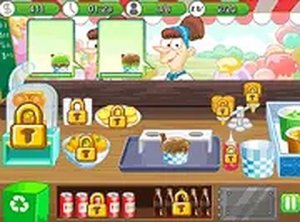
Ice Cream Treat Serving Game is a fast-paced arcade simulation where players take on the role of a server at an ice cream bar. The core objective is to fulfill customer orders by assembling ice cream treats as quickly and accurately as possible. This game tests your speed, memory, and focus in a family-friendly environment. It is designed for short gaming sessions or longer play, with a gradually increasing challenge that keeps the experience engaging. The game runs directly in your browser with no downloads required and is completely free to play. Its simple concept and colorful presentation make it accessible to players of all ages.
How to Play
When a customer arrives, their order is displayed on screen, showing the specific ingredients needed in a particular sequence. Players click on each ingredient icon in the exact order shown, from top to bottom. After adding all required ingredients, click the ice cream icon to serve the completed order. Speed and accuracy are key—faster service earns higher scores, while mistakes slow you down. The controls are simple and intuitive, allowing you to start playing immediately without complex instructions. The game is designed to be easy to pick up but offers increasing challenge as you progress.
Game Features
This game offers fast-paced serving fun for players of all ages. It features colorful graphics and simple click-based controls that make it easy to pick up and play. The difficulty increases gradually, ensuring the challenge remains fresh over time. Full screen mode is available for a more immersive experience. The game works on both mobile devices and desktop computers, and it supports play in any modern web browser without requiring any downloads or installations. It is completely free to play with no hidden costs.
Tips for Success
To achieve high scores, focus on memorizing the order of ingredients for each customer as quickly as possible. Practice regularly to improve your reaction time and accuracy. Avoid rushing—making mistakes will cost you valuable time. Pay close attention to the order display and click each ingredient in the correct sequence. Staying calm under pressure will help you maintain speed as the pace increases. Over time, you will develop better hand-eye coordination and memory skills that make serving faster and more efficient.