Coaster Park Designer
Reviews
💡Coaster Park Designer offers a satisfying blend of creativity and light strategy. The drag-and-drop building is intuitive, and testing each ride for thrills and safety adds a rewarding challenge. Unlocking new parts keeps the experience fresh, and the browser-based play makes it accessible anywhere. Perfect for casual players and coaster enthusiasts alike.
Description
Game Introduction
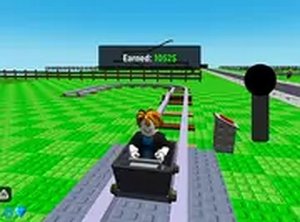
Coaster Park Designer is a creative simulation game where you take on the role of an amusement park designer. Your main goal is to design and build exciting roller coasters by connecting track pieces, adding loops and twists, and testing each ride for both excitement and safety. Success earns you in-game currency to expand and upgrade your park, attracting more visitors. This game blends creativity with light strategy, making it enjoyable for players of all ages. It runs instantly on any device without downloads, offering a family-friendly experience that sparks imagination and problem-solving. The game focuses on the joy of designing unique coasters and managing park growth.
How to Play
To play, you start by selecting track pieces from a menu and placing them on a grid. You connect the pieces to form a complete track, adding loops, twists, and turns to make the ride exciting. Once your design is ready, you can test the coaster to see it in action. The ride is evaluated based on thrill level and safety. You can then adjust your design to improve the balance, then launch the coaster to earn coins. Use your earnings to unlock new track parts, decorations, and park upgrades. The game features intuitive drag-and-drop controls and works on desktop and mobile browsers.
Game Features
Creative coaster building with a variety of track pieces is at the heart of the game. Simple drag-and-drop controls make design easy. Park management elements let you earn and spend coins to expand your park. You can add loops and twists to increase thrill, test each ride for safety, and unlock new parts and decorations as you progress. The game is free to play online with no downloads required, and it runs on any device with a web browser.
Tips for Success
To build successful coasters, focus on balancing thrill and safety. Start with simple designs and gradually add more loops and twists as you learn the mechanics. Test each ride multiple times to see where adjustments are needed. Earn coins by creating coasters that excite visitors, then reinvest in new track pieces and park upgrades. Experiment with different layouts to discover what works best. Practice regularly to improve your design skills and attract more guests to your park.