Skeleton Movement Learning Game
Reviews
💡This educational simulation makes learning anatomy engaging by letting you control a skeleton's joints. The intuitive controls allow easy experimentation, and adding a second skeleton adds playful interaction. It is a creative tool for understanding movement mechanics without any violent content.
Description
Game Introduction
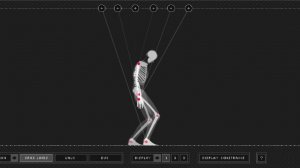
Skeleton Movement Learning Game is an educational simulation that lets players explore human anatomy by controlling a skeleton's joints. Developed as a playful science experiment, it offers a blend of learning and entertainment. The core objective is to adjust articulation points like knees, elbows, or spine to see how each change affects walking patterns. What makes it special is its focus on anatomy education through hands-on experimentation, allowing curious minds to understand movement mechanics in a fun, interactive way.
How to Play
Players interact with the skeleton by tapping or clicking on different joint points. By selecting and manipulating articulation points, you can change the skeleton's posture and walking style. Experiment with various combinations to create different gaits and observe the results. The controls are designed to be intuitive, making it accessible for players of all ages. Simply click and drag to move joints, and watch how each adjustment alters the skeleton's movement. You can also add a second skeleton to the scene to see how they interact.
Game Features
Interactive joint control allows you to manipulate multiple articulation points on the skeleton. The game provides educational science fun by teaching basic anatomy and movement mechanics. It includes playful skeleton interactions when multiple skeletons are added, creating a lighthearted exploration. The simple, intuitive controls make it easy for anyone to experiment freely. This simulation focuses on learning through experimentation, offering a creative way to understand how the human body moves.
Tips for Success
Start by making small adjustments to one joint at a time to see its specific effect on movement. Gradually combine changes to create more complex walking patterns. Experiment with different joint angles to discover the full range of motion. Adding a second skeleton can provide additional insights into interaction and balance. Practice regularly to understand how each articulation point contributes to overall movement. The key is to explore freely and enjoy the learning process.